
You can automatically confirm an order when its payment status changes to Paid. This helps streamline your order workflow and reduces the need to manually confirm orders.
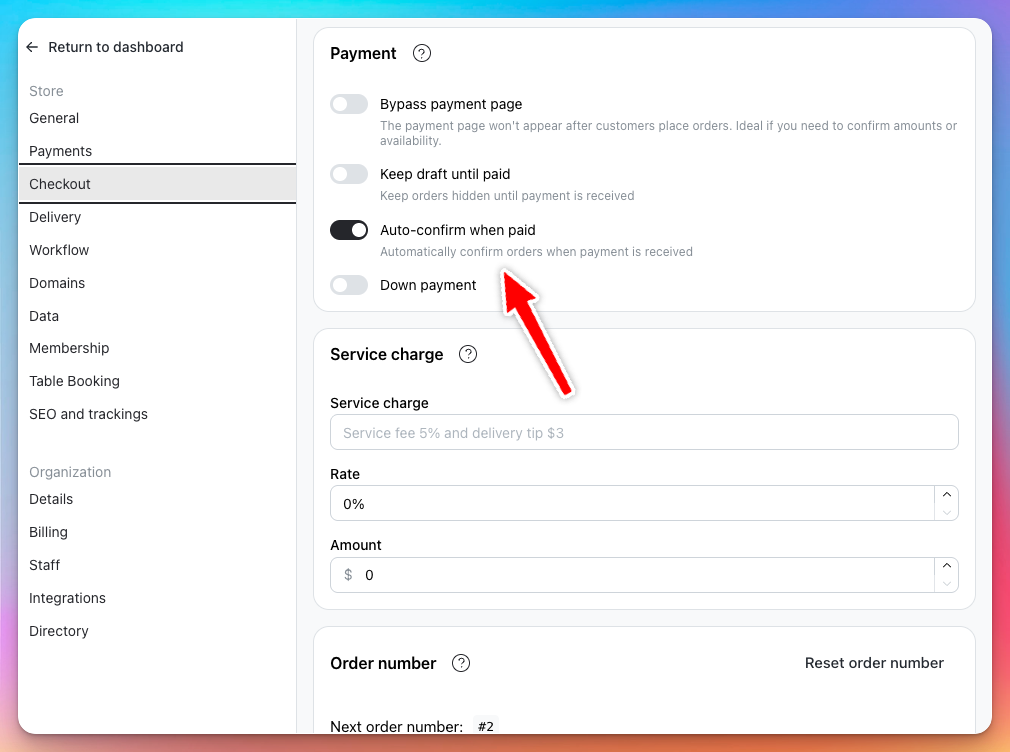
How to enable auto-confirm
-
Go to Settings
-
Select Checkout
-
Scroll to the Payment section
-
Toggle on "Auto-confirm when paid"
How it works
When this setting is enabled, any order that changes to the Paid status will automatically be confirmed.
This applies whether the payment status changes automatically through a payment gateway or if you manually update the payment status to Paid.
Benefits
- Faster order processing → Orders are confirmed immediately once marked as paid.
- Less manual work → You don’t need to manually confirm paid orders.
- Better customer experience → Customers receive confirmation faster after payment.