
The "Copy for AI" button lets you copy your product's details as clean, structured text — perfect for pasting into ChatGPT or similar AI tools to write descriptions, marketing copy, or analyze your product.
How to use it
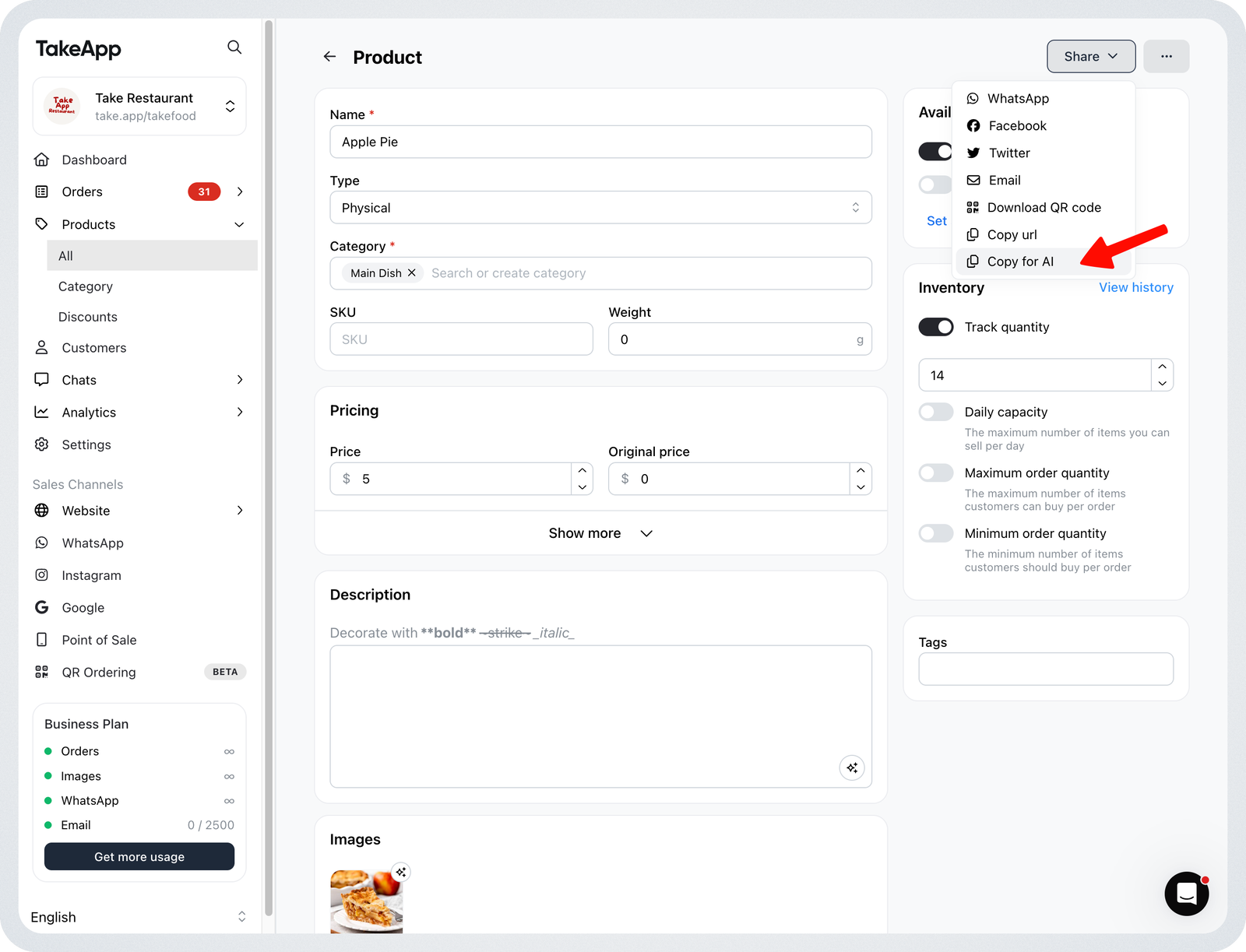
- Go to Admin > Products and open the product you want to copy.
- Click the
Sharemenu. - Click
Copy for AI. - Paste the copied text into ChatGPT or any AI tool to ask questions, generate descriptions, or get suggestions about your product.
What gets copied
The button copies your product details as markdown text, including:
- Product name, URL, type, visibility, SKU, and status
- Categories
- Description
- Variants and their prices
Example of copied text:
# Margherita Pizza
## Product details
- URL: take.app/bali_dining/p/margherita-pizza
- Type: PHYSICAL
- Visibility: VISIBLE
- SKU: PZA-MRG
- Status: Available
- Categories: Pizza
## Description
- Tomato, mozzarella, and fresh basil on a thin base.
## Variants
### Large
- Price: SGD 50
### Regular
- Price: SGD 30