
HitPay is a seamless and secure payment gateway that enables businesses in APAC to accept online payments effortlessly. With support for multiple payment methods, including credit cards, PayNow, GrabPay, Apple Pay, Google Pay, and more, HitPay helps streamline transactions and improve the checkout experience for customers.
How to add HitPay as payment method
-
Ensure your store currency is one of the following:
'AED', 'AUD', 'BRL', 'CAD', 'CHF', 'DKK', 'EUR', 'GBP', 'HKD', 'IDR',
'INR', 'JPY', 'KRW', 'MYR', 'MXN', 'NOK', 'NZD', 'PLN', 'PHP', 'RMB',
'RUB', 'SEK', 'SGD', 'THB', 'TRY', 'TWD', 'USD', 'VND', 'ZAR'
You can change store currency by visiting Settings > General. -
Go to
Settings > Integrationsand chooseHitPay. Add your API Key and Salt (See below for details) into the input box, and clickAdd.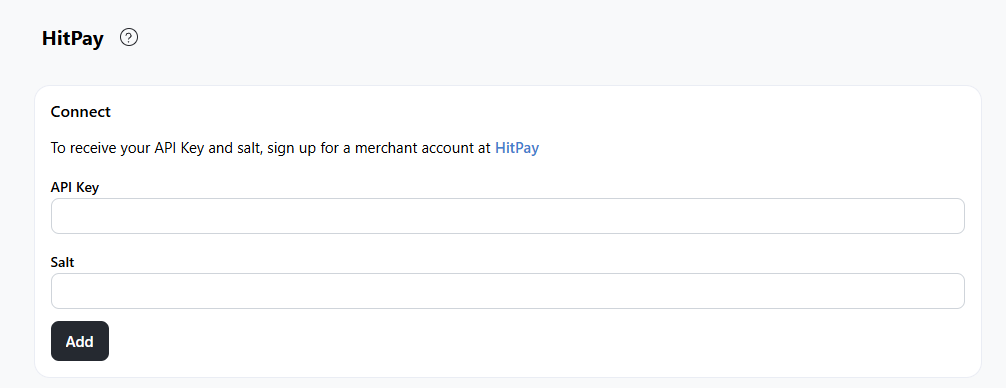
-
Go to Settings > Payments > On automated payment methods, click
Add -
Choose
HitPay, then choose your credentials from the selection screen.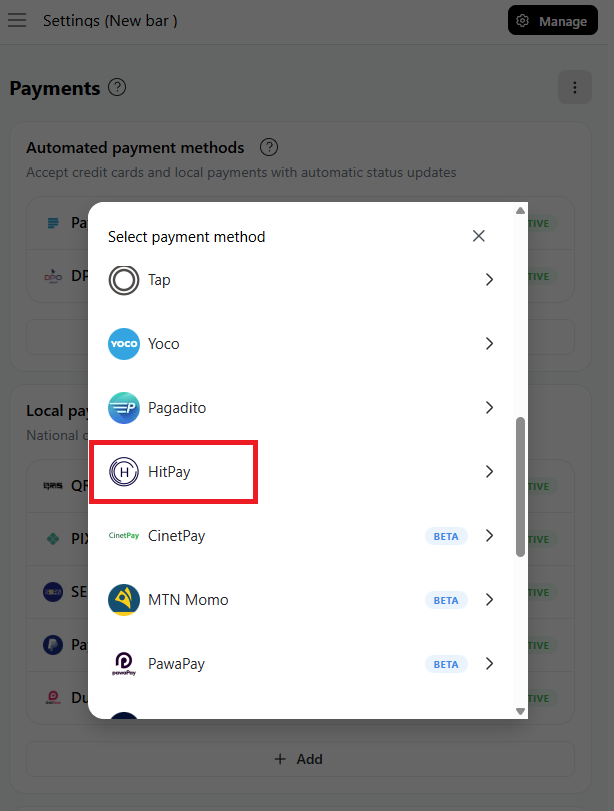
-
Finally, click on
Save.
How to find your HitPay API Key and Salt?
- Log in to your HitPay Dashboard (dashboard.hit-pay.com) using your HitPay credentials.
- You can find your HitPay API Key and Salt Keys by navigating to Payment Gateway > API in the HitPay dashboard.