Paystack is a financial technology company that offers payment processing services to businesses in Africa, including Nigeria, Ghana, South Africa, Kenya, and Côte d'Ivoire. With it, you can accept various payment methods such as bank transfer and credit card.
How to add Paystack as payment method
- Ensure your store currency is one of the following: GHS, NGN, USD, ZAR, KES, XOF. You can change store currency by visiting Store > Details.
- Go to Admin > Settings > Payments and click
Add payment method. - Choose Paystack and save.
- Click Paystack
Settingsto complete the setup by keying in your public key and secret key.
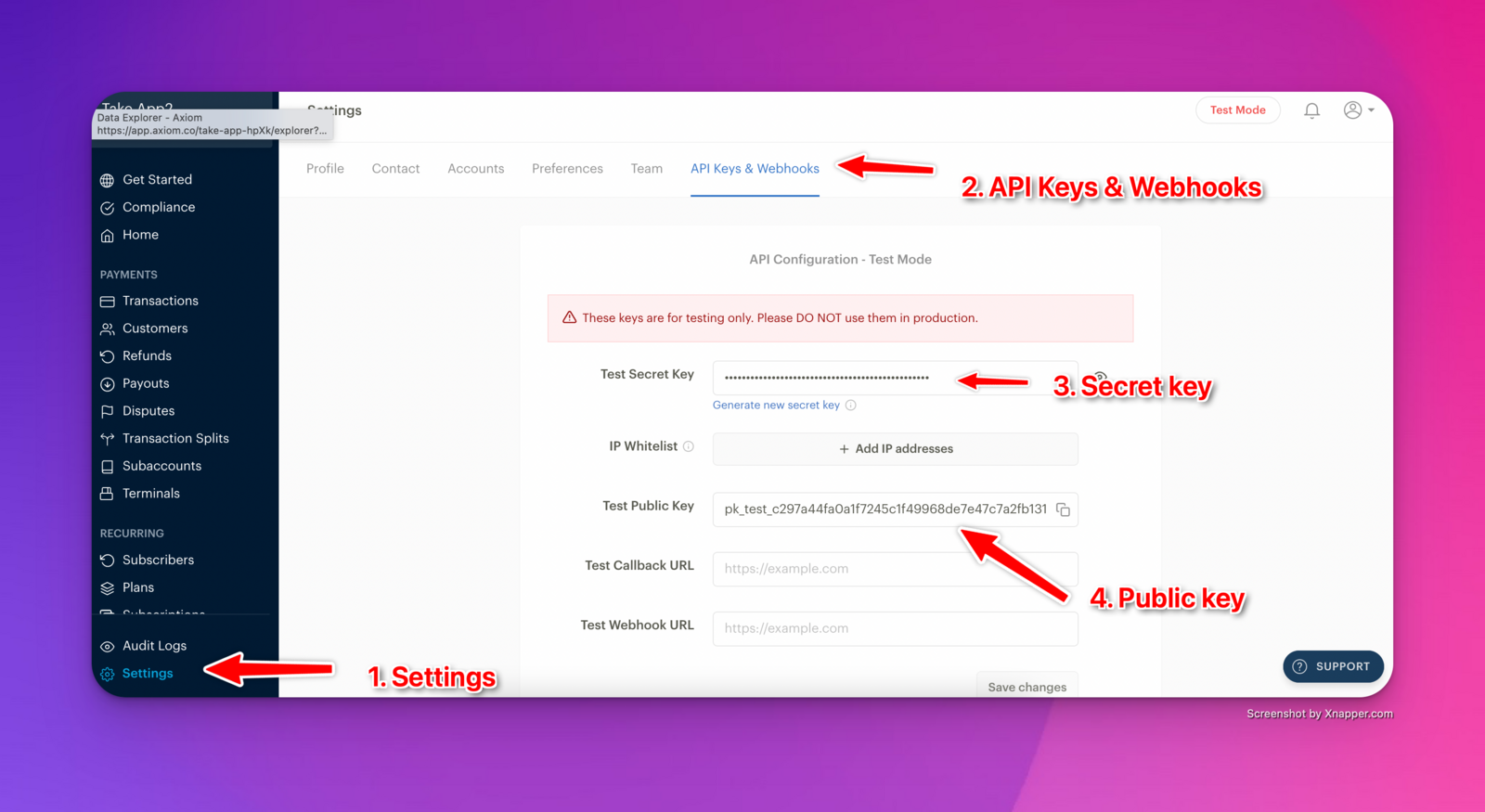
How to find your Paystack Public key and Secret key?
- Log in to your Paystack account dashboard
- Go through the Compliance process to activate your Paystack account.
- Once activated, find your live public key and live secret key in your dashboard
- You can go to Settings on the left-hand side menu. Click on the API Keys & Webhooks tab. Your live public key and live private key will be shown to you.